分类 编程.UnityShader 中的文章

shader初尝试 | 给石头覆盖一层雪景(Hello World)

给石头覆盖一层雪景

资源准备

在Unity中创建一个项目,导入石头模型,下面就开始利用shader给石头做一个雪景覆盖.

实现效果

未覆盖雪景的样子
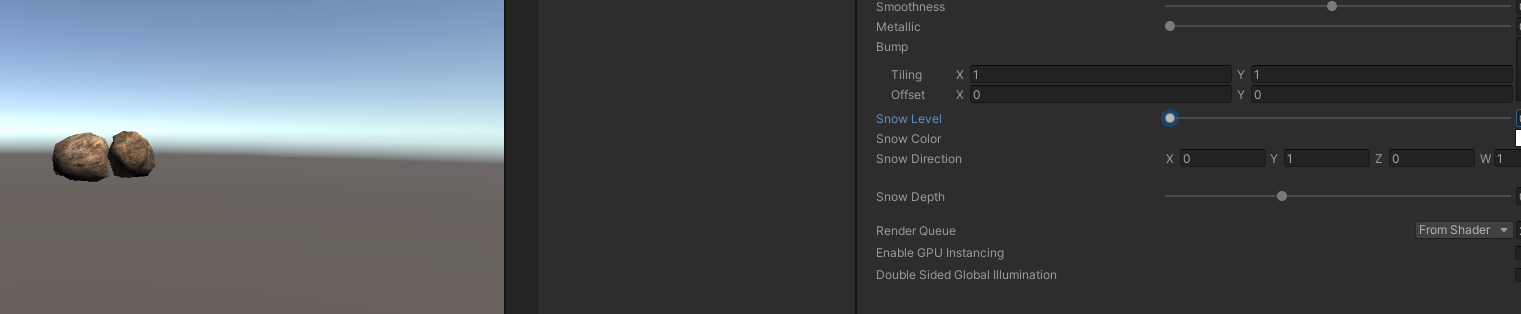
覆盖了雪景的样子
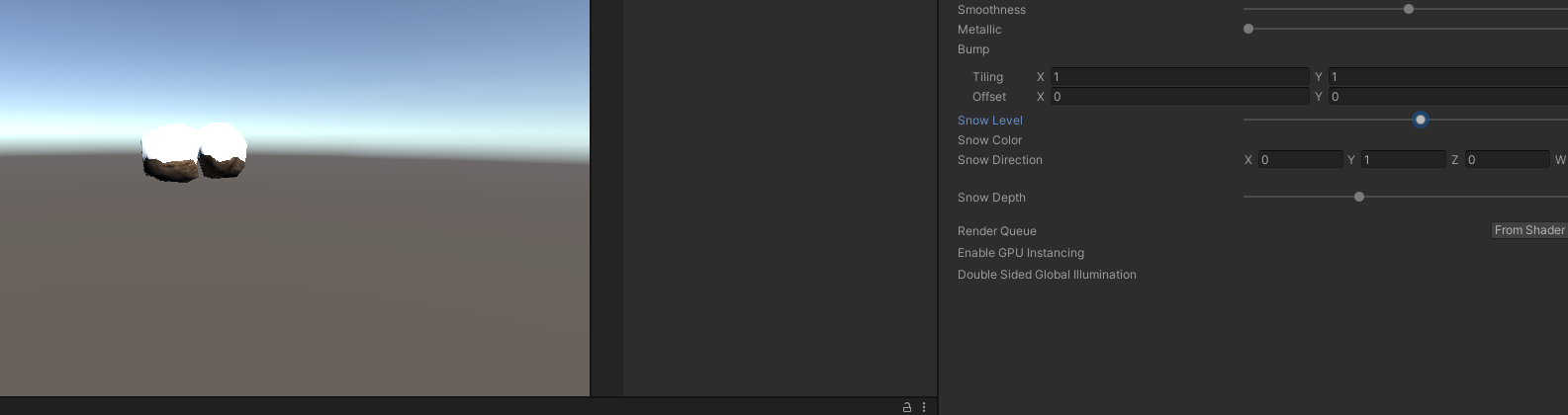
开始代码

我在代码中标注了1,2,3,4,5

代码
// Upgrade NOTE: replaced '_Object2World' with 'unity_ObjectToWorld'

Shader "Custom/Diffuse Texture"
{
    Properties
    {
        _Color ("Color", Color) = (1,1,1,1)
        _MainTex ("Albedo (RGB)", 2D) = "white" {}
        _Glossiness ("Smoothness", Range(0,1)) = 0.5
        _Metallic ("Metallic", Range(0,1)) = 0.0

        //1
        _Bump("Bump", 2D) = "bump" {}
        _Snow ("Snow Level", Range(0, 1)) = 0.1
        _SnowColor ("Snow Color", Color) = (1.0, 1.0, 1.0, 1.0)
        _SnowDirection ("Snow Direction", Vector) = (0, 1, 0)
        _SnowDepth ("Snow Depth", Range(0, 0.3)) = 0.1
    }
    SubShader
    {
        Tags { "RenderType"="Opaque" }
        LOD 200

        CGPROGRAM
        // Physically based Standard lighting model, and enable shadows on all light types
        #pragma surface surf CustomDiffuse vertex:vert

        // Use shader model 3.0 target, to get nicer looking lighting
        #pragma target 3.0

        sampler2D _MainTex;

        //2
        sampler2D _Bump;
        float _Snow;
        float4 _SnowColor;
        float4 _SnowDirection;
        float _SnowDepth;

        struct Input
        {
            float2 uv_MainTex;

            //3
            float2 uv_Bump;
            float3 worldNormal; INTERNAL_DATA
        };

        half _Glossiness;
        half _Metallic;
        fixed4 _Color;

        // Add instancing support for this shader. You need to check 'Enable Instancing' on materials that use the shader.
        // See https://docs.unity3d.com/Manual/GPUInstancing.html for more information about instancing.
        // #pragma instancing_options assumeuniformscaling
        UNITY_INSTANCING_BUFFER_START(Props)
            // put more per-instance properties here
        UNITY_INSTANCING_BUFFER_END(Props)

        void surf (Input IN, inout SurfaceOutput o)
        {
            // Albedo comes from a texture tinted by color
            fixed4 c = tex2D (_MainTex, IN.uv_MainTex) * _Color;
            //4
            o.Normal = UnpackNormal(tex2D(_Bump, IN.uv_Bump));
            if (dot(WorldNormalVector(IN, o.Normal), _SnowDirection.xyz) > lerp(1, -1, _Snow))
            {
                o.Albedo = _SnowColor.rgb;
            }
            else
            {
                o.Albedo = c.rgb;
            }

            o.Alpha = c.a;
        }

        inline float4 LightingCustomDiffuse (SurfaceOutput s, fixed3 lightDir, fixed atten)
        {
            float difLight = dot(s.Normal, lightDir);
            float hLambert = difLight * 0.5 + 0.5;

            float4 col;
            col.rgb = s.Albedo * _LightColor0.rgb * (difLight * atten * 2);
            col.a = s.Alpha;
            return col;
        }

        //5
        void vert(inout appdata_full v)
        {
            float4 sn = mul(transpose(unity_ObjectToWorld), _SnowDirection);
            if (dot(v.normal, sn.xyz) >= lerp(1, -1, (_Snow * 2)/ 3))
            {
                v.vertex.xyz += (sn.xyz + v.normal) * _SnowDepth * _Snow;
            }
        }
        ENDCG
    }
    FallBack "Diffuse"
}

  1. 声明并加入一个显示名称为Bump的贴图,用于放置法线图

    ……

    阅读全文

shader初尝试 | 给石头覆盖一层雪景(Hello World)

给石头覆盖一层雪景

资源准备

在Unity中创建一个项目,导入石头模型,下面就开始利用shader给石头做一个雪景覆盖.

实现效果

未覆盖雪景的样子

覆盖了雪景的样子

开始代码

我在代码中标注了1,2,3,4,5

代码
// Upgrade NOTE: replaced '_Object2World' with 'unity_ObjectToWorld'

Shader "Custom/Diffuse Texture"
{
    Properties
    {
        _Color ("Color", Color) = (1,1,1,1)
        _MainTex ("Albedo (RGB)", 2D) = "white" {}
        _Glossiness ("Smoothness", Range(0,1)) = 0.5
        _Metallic ("Metallic", Range(0,1)) = 0.0

        //1
        _Bump("Bump", 2D) = "bump" {}
        _Snow ("Snow Level", Range(0, 1)) = 0.1
        _SnowColor ("Snow Color", Color) = (1.0, 1.0, 1.0, 1.0)
        _SnowDirection ("Snow Direction", Vector) = (0, 1, 0)
        _SnowDepth ("Snow Depth", Range(0, 0.3)) = 0.1
    }
    SubShader
    {
        Tags { "RenderType"="Opaque" }
        LOD 200

        CGPROGRAM
        // Physically based Standard lighting model, and enable shadows on all light types
        #pragma surface surf CustomDiffuse vertex:vert

        // Use shader model 3.0 target, to get nicer looking lighting
        #pragma target 3.0

        sampler2D _MainTex;

        //2
        sampler2D _Bump;
        float _Snow;
        float4 _SnowColor;
        float4 _SnowDirection;
        float _SnowDepth;

        struct Input
        {
            float2 uv_MainTex;

            //3
            float2 uv_Bump;
            float3 worldNormal; INTERNAL_DATA
        };

        half _Glossiness;
        half _Metallic;
        fixed4 _Color;

        // Add instancing support for this shader. You need to check 'Enable Instancing' on materials that use the shader.
        // See https://docs.unity3d.com/Manual/GPUInstancing.html for more information about instancing.
        // #pragma instancing_options assumeuniformscaling
        UNITY_INSTANCING_BUFFER_START(Props)
            // put more per-instance properties here
        UNITY_INSTANCING_BUFFER_END(Props)

        void surf (Input IN, inout SurfaceOutput o)
        {
            // Albedo comes from a texture tinted by color
            fixed4 c = tex2D (_MainTex, IN.uv_MainTex) * _Color;
            //4
            o.Normal = UnpackNormal(tex2D(_Bump, IN.uv_Bump));
            if (dot(WorldNormalVector(IN, o.Normal), _SnowDirection.xyz) > lerp(1, -1, _Snow))
            {
                o.Albedo = _SnowColor.rgb;
            }
            else
            {
                o.Albedo = c.rgb;
            }

            o.Alpha = c.a;
        }

        inline float4 LightingCustomDiffuse (SurfaceOutput s, fixed3 lightDir, fixed atten)
        {
            float difLight = dot(s.Normal, lightDir);
            float hLambert = difLight * 0.5 + 0.5;

            float4 col;
            col.rgb = s.Albedo * _LightColor0.rgb * (difLight * atten * 2);
            col.a = s.Alpha;
            return col;
        }

        //5
        void vert(inout appdata_full v)
        {
            float4 sn = mul(transpose(unity_ObjectToWorld), _SnowDirection);
            if (dot(v.normal, sn.xyz) >= lerp(1, -1, (_Snow * 2)/ 3))
            {
                v.vertex.xyz += (sn.xyz + v.normal) * _SnowDepth * _Snow;
            }
        }
        ENDCG
    }
    FallBack "Diffuse"
}

  1. 声明并加入一个显示名称为Bump的贴图,用于放置法线图

    ……

    阅读全文

UnityShader基本概念

何为shader

shader中文翻译为着色器,其实是一种用来渲染图形的技术,我们可以通过shader编程,来自定义显卡渲染画面的算法,显示我们所期望的结果。

shader种类

  • 顶点着色器: 处理每个顶点,将顶点的空间位置投影在屏幕上,即计算顶点的二维坐标。同时,它也负责顶点的深度缓冲(Z-Buffer)的计算。顶点着色器可以掌控顶点的位置、颜色和纹理坐标等属性,但无法生成新的顶点。顶点着色器的输出传递到流水线的下一步。如果有之后定义了几何着色器,则几何着色器会处理顶点着色器的输出数据,否则,光栅化器继续流水线任务。

    ……

    阅读全文

UnityShader基本概念

何为shader

shader中文翻译为着色器,其实是一种用来渲染图形的技术,我们可以通过shader编程,来自定义显卡渲染画面的算法,显示我们所期望的结果。

shader种类

  • 顶点着色器: 处理每个顶点,将顶点的空间位置投影在屏幕上,即计算顶点的二维坐标。同时,它也负责顶点的深度缓冲(Z-Buffer)的计算。顶点着色器可以掌控顶点的位置、颜色和纹理坐标等属性,但无法生成新的顶点。顶点着色器的输出传递到流水线的下一步。如果有之后定义了几何着色器,则几何着色器会处理顶点着色器的输出数据,否则,光栅化器继续流水线任务。

    ……

    阅读全文